

PicWish claims its AI technology can help you remove backgrounds, restore old photos, and upscale image quality in just a few seconds. It sounds incredibly enticing, especially for those who don’t know their way around Photoshop.
But does the AI genuinely deliver on those promises, or does it simply create a “prettier” picture that lacks accuracy?
To answer this question, I spent nearly half a day putting PicWish to the test across its four most popular tasks: background removal, image upscaling, old photo restoration, and object removal. The results revealed that PicWish excels at repetitive, data-enhancement tasks. However, when the AI is forced to recreate missing details from scratch, its accuracy drops significantly.
If you are considering pulling out your wallet for this tool, here is my hands-on experience and detailed breakdown for ThomasReview.
What Is PicWish?
PicWish is an AI-powered photo editing ecosystem designed for users who need to process images quickly without spending hours learning professional software like Photoshop. Instead of manual editing and complex layering, you simply upload your photo and let the AI automatically handle tasks such as:
-
AI Background Remover
-
AI Image Upscaler (Enlargement & Quality Enhancement)
-
AI Photo Restoration
-
AI Object Remover
-
Batch Processing
-
Passport and ID Photo Creation
From my experience, PicWish primarily targets four core user groups: E-commerce sellers, Content Creators, Small Business Owners, and Casual Users looking for quick photo fixes.
🎬 Alongside images, AI music videos are the ultimate weapon to skyrocket your traffic this year! Don’t miss out on our real-world ranking: Which AI Music Video Tool is Worth the Money in 2026? to find the most cost-effective assistant for creating “million-view” music videos! 🚀
How I Tested PicWish
Instead of just relying on the developer’s marketing materials, I put PicWish’s four most critical features to the test using real-world images in four distinct trials:
-
Test 1: AI Background Remover
-
Test 2: AI Image Upscaler
-
Test 3: AI Photo Restoration
-
Test 4: AI Object Remover
For each test, I compared the before-and-after images and rigorously evaluated them based on Sharpness, Texture, Color, Naturalness, and Preservation of original details.
Detailed Breakdown of the 4 Hands-On Tests
Test 1 – AI Background Remover (Score: 7/10)
This is the bread-and-butter feature for online sellers, so I decided to kick things off here.
-
The Test: I used a photo of a nude/beige handbag which features fine details like stitching, gold metal hardware, and a smooth leather surface. This is a tricky image to process because the off-white background and the cascading white flowers could easily confuse the AI around the thin shoulder strap.


- The Result: PicWish processed the image almost instantly without requiring any manual adjustments. The edges around the bag were cut remarkably clean; the slim strap and the gold logo remained intact. However, upon closer inspection, the post-processed image felt a bit “soft.” The fine texture on the leather surface lost some sharpness, and the overall contrast was lower than the original.
ThomasReview Verdict:
Pros: Blazing fast processing speed; Highly accurate edge detection; Preserves complex elements well.
Cons: Slight loss of image sharpness and a minor reduction in surface texture after processing.
Test 2 – AI Image Upscaler (Score: 8/10)
This was easily the most impressive and satisfying feature during my testing window.
-
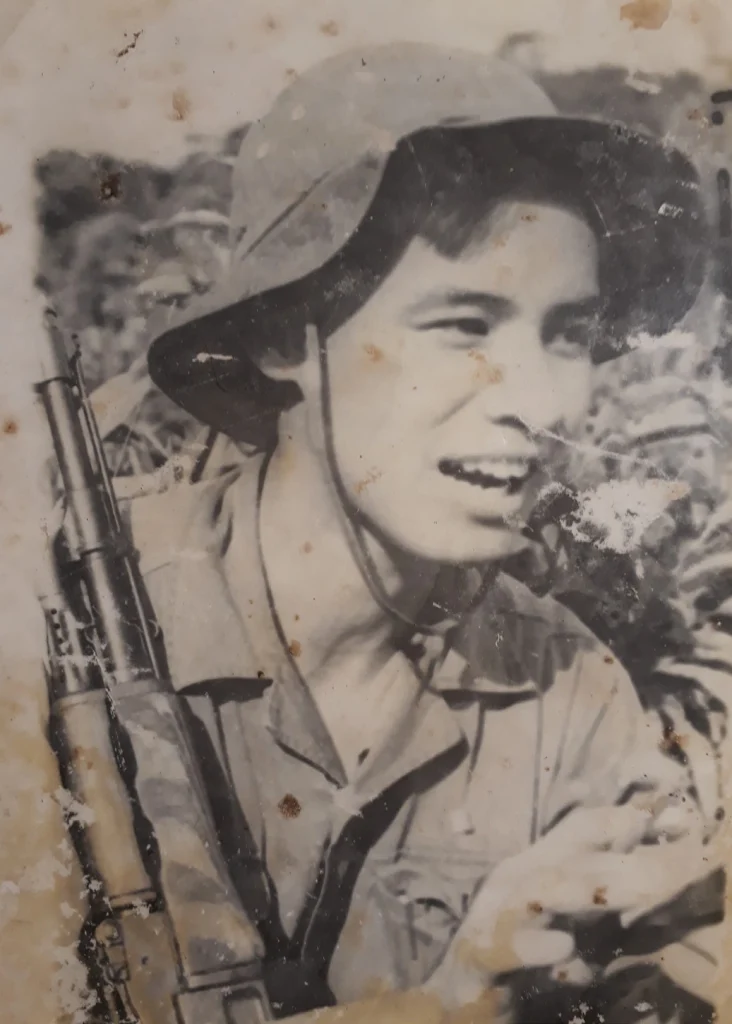
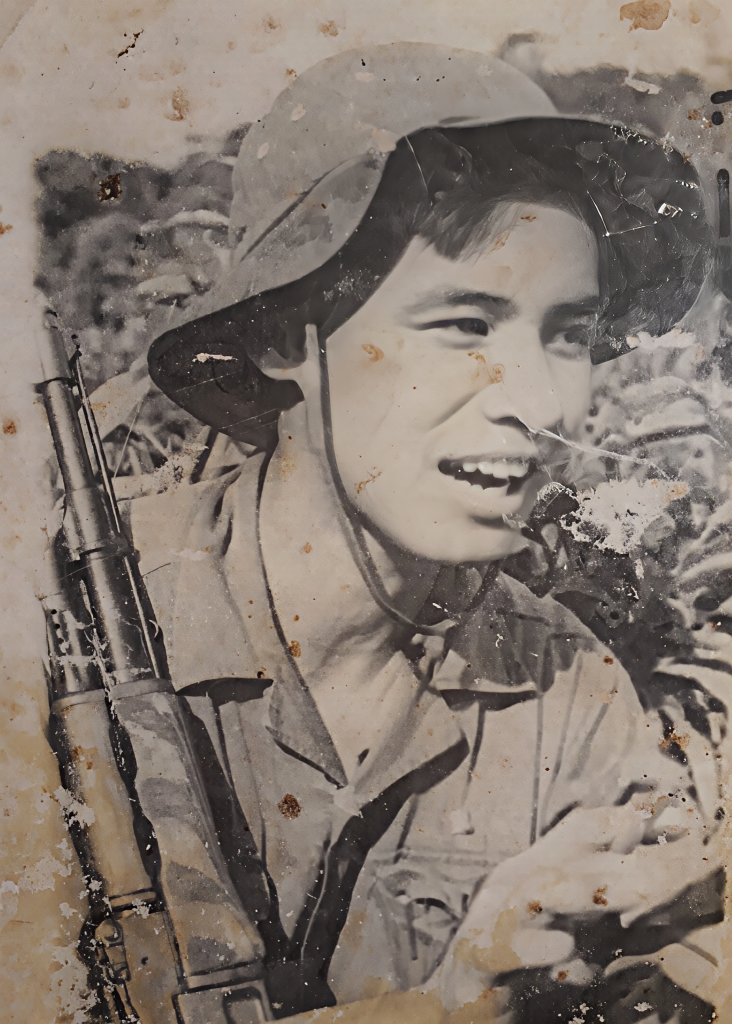
The Test: I uploaded a low-resolution, slightly blurry old photo to see if the AI could sharpen it while maintaining a natural look.
-
The Result: The difference was night and day. Facial features became noticeably sharper, hair outlines were clearer, and the contrast was vastly improved—completely getting rid of that muddy, pixelated feel. Most importantly, PicWish didn’t fall into the common AI trap of “hallucinating” fake details (like adding weirdly artificial hair strands or bizarre eyelashes), which is a massive win.
-
Cons: The AI cannot generate something out of nothing. If the original photo is severely blurred or missing massive amounts of pixel data, the result won’t magically look like it was shot on a high-end DSLR. However, for website use or social media, it is more than sufficient.
ThomasReview Verdict:
Pros: Clear improvement in sharpness; Natural-looking results; No artificial detail hallucination.
Cons: Effectiveness drops drastically if the original image suffers from heavy motion blur or severe data loss.
Test 3 – AI Photo Restoration (Score: 6/10)
Restoring old photos is a much tougher hurdle because the AI must simultaneously sharpen the image and “invent” details that have been eroded by time.
-
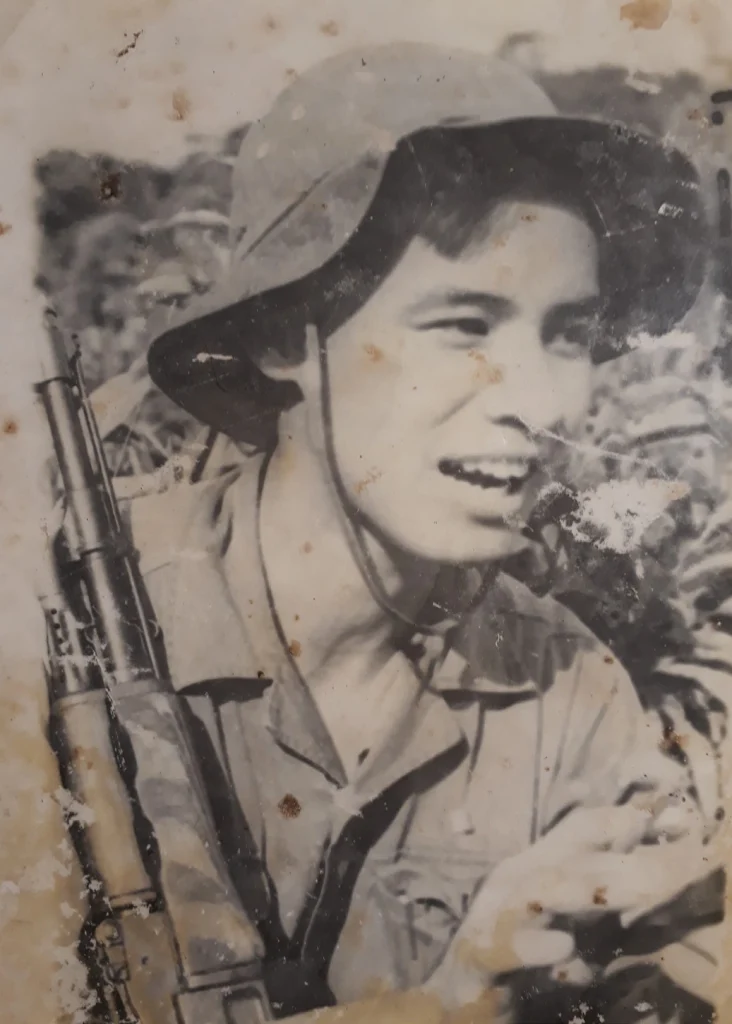
The Test: I used a degraded black-and-white photo where several details were barely visible to the naked eye.

-
The Result: The processed image was noticeably clearer, and the AI-generated colorization felt relatively harmonious—making it perfectly fine for personal nostalgia or casual sharing. However, when zooming in on the finer details, the AI’s limitations became obvious. The subject’s hand suffered from minor warping, and the structural details on a rifle barrel were inaccurate compared to the original. The colorized skin tone also looked somewhat flat, lacking historical depth.
ThomasReview Verdict:
Pros: Significant boost in clarity; Pleasing and well-blended AI colorization.
Cons: AI interpolation leads to inaccurate details; Prone to structural distortion (e.g., fingers); Unsuitable for historical archives that demand 100% authenticity.
Test 4 – AI Object Remover (Score: 6/10)
This feature evaluates the AI’s ability to seamlessly reconstruct the background after a target object is erased.
-
The Test: I chose a beach vacation photo that had an unwanted stranger standing in the background behind the main subject.


- The Result: PicWish removed the person very quickly. Looking at it casually on a phone screen, the result seemed natural enough for social media. However, once blown up on a desktop monitor, the “photo patch” marks became evident. The patterns of the sand and ocean waves were disconnected, making it look like a smudge of color was pasted over the area rather than fully regenerated.
ThomasReview Verdict:
Pros: Incredibly straightforward operation; Fast execution; Good enough for casual travel photos.
Cons: Struggles to cleanly regenerate complex textures (like waves, foliage, or crowds); Edits become obvious when zoomed in.
The Core of PicWish: The Law of “Generative Data”
After half a day of testing, a clear rule emerged regarding PicWish’s algorithms: The tool’s effectiveness is inversely proportional to the amount of data the AI has to invent.
-
When the task is to enhance existing data (like isolating backgrounds or sharpening lines), PicWish is exceptional.
-
When the task requires the AI to imagine and fill in missing data (like patching complex backgrounds or drawing lost historical details), the accuracy noticeably drops.
Target Audience: Who Should and Shouldn’t Buy PicWish?
To help you make an informed decision, here is how ThomasReview categorizes who will get the most value out of this tool:
| User Group | Suitability | Primary Use Case | ThomasReview Recommendation |
| E-commerce Sellers | ⭐⭐⭐⭐⭐ (Very High) | Batch removing product backgrounds, sharpening product photos for e-commerce stores. | Highly Recommended. Saves a massive amount of time and hiring costs for designers. |
| Content Creators / SMEs | ⭐⭐⭐⭐☆ (High) | Editing stock images, creating thumbnails, quick object removal for rapid content creation. | Recommended. Great for optimizing workflows and fast turnarounds. |
| Casual Users | ⭐⭐⭐⭐☆ (High) | Enhancing family photos, erasing photobombers from vacation shots, creating ID photos. | Stick to the free version or buy pay-as-you-go credits as needed. |
| Photographers / Designers | ⭐⭐☆☆☆ (Low) | High-end editing requiring absolute pixel control and preservation of raw textures. | Not Recommended. The AI “softens” images and reduces texture, which doesn’t meet print-quality standards. |
| Archivists / Historians | ⭐☆☆☆☆ (Very Low) | Restoring historical records and archival photos requiring 100% historical accuracy. | Do Not Use. The AI interpolates and invents details, destroying the original authenticity of the record. |
Conclusion: Is PicWish Actually Worth the Money?
Going back to the question we posed at the beginning: Does PicWish genuinely help someone with zero Photoshop skills edit photos quickly and affordably?
My answer is: Yes, but only if you use it for its intended purpose.
PicWish was not built to replace Photoshop, nor is it meant for perfectionists who demand absolute control over every pixel. Its true superpower is automation and speed for repetitive tasks. If you value efficiency, simplicity, and a “one-click” workflow, PicWish is an excellent assistant that will save you hours of tedious work.
ThomasReview Score: 7.2/10
While it might not hold the crown for the most powerful AI model on the market, when it comes to practicality and performance-to-price ratio, it is absolutely a worthy contender for your daily workflow.
Have you tried using PicWish or any other AI tools for batch photo editing? Let us know your thoughts and share your experiences in the comments below!
-
The Result: The difference was night and day. Facial features became noticeably sharper, hair outlines were clearer, and the contrast was vastly improved—completely getting rid of that muddy, pixelated feel. Most importantly, PicWish didn’t fall into the common AI trap of “hallucinating” fake details (like adding weirdly artificial hair strands or bizarre eyelashes), which is a massive win.
-
Cons: The AI cannot generate something out of nothing. If the original photo is severely blurred or missing massive amounts of pixel data, the result won’t magically look like it was shot on a high-end DSLR. However, for website use or social media, it is more than sufficient.
ThomasReview Verdict:
Pros: Clear improvement in sharpness; Natural-looking results; No artificial detail hallucination.
Cons: Effectiveness drops drastically if the original image suffers from heavy motion blur or severe data loss.
Test 3 – AI Photo Restoration (Score: 6/10)
Restoring old photos is a much tougher hurdle because the AI must simultaneously sharpen the image and “invent” details that have been eroded by time.
-
The Test: I used a degraded black-and-white photo where several details were barely visible to the naked eye.
-
The Result: The processed image was noticeably clearer, and the AI-generated colorization felt relatively harmonious—making it perfectly fine for personal nostalgia or casual sharing. However, when zooming in on the finer details, the AI’s limitations became obvious. The subject’s hand suffered from minor warping, and the structural details on a rifle barrel were inaccurate compared to the original. The colorized skin tone also looked somewhat flat, lacking historical depth.
ThomasReview Verdict:
Pros: Significant boost in clarity; Pleasing and well-blended AI colorization.
Cons: AI interpolation leads to inaccurate details; Prone to structural distortion (e.g., fingers); Unsuitable for historical archives that demand 100% authenticity.
Test 4 – AI Object Remover (Score: 6/10)
This feature evaluates the AI’s ability to seamlessly reconstruct the background after a target object is erased.
-
The Test: I chose a beach vacation photo that had an unwanted stranger standing in the background behind the main subject.
-
The Result: PicWish removed the person very quickly. Looking at it casually on a phone screen, the result seemed natural enough for social media. However, once blown up on a desktop monitor, the “photo patch” marks became evident. The patterns of the sand and ocean waves were disconnected, making it look like a smudge of color was pasted over the area rather than fully regenerated.
ThomasReview Verdict:
Pros: Incredibly straightforward operation; Fast execution; Good enough for casual travel photos.
Cons: Struggles to cleanly regenerate complex textures (like waves, foliage, or crowds); Edits become obvious when zoomed in.
The Core of PicWish: The Law of “Generative Data”
After half a day of testing, a clear rule emerged regarding PicWish’s algorithms: The tool’s effectiveness is inversely proportional to the amount of data the AI has to invent.
-
When the task is to enhance existing data (like isolating backgrounds or sharpening lines), PicWish is exceptional.
-
When the task requires the AI to imagine and fill in missing data (like patching complex backgrounds or drawing lost historical details), the accuracy noticeably drops.
Target Audience: Who Should and Shouldn’t Buy PicWish?
To help you make an informed decision, here is how ThomasReview categorizes who will get the most value out of this tool:
| User Group | Suitability | Primary Use Case | ThomasReview Recommendation |
| E-commerce Sellers | ⭐⭐⭐⭐⭐ (Very High) | Batch removing product backgrounds, sharpening product photos for e-commerce stores. | Highly Recommended. Saves a massive amount of time and hiring costs for designers. |
| Content Creators / SMEs | ⭐⭐⭐⭐☆ (High) | Editing stock images, creating thumbnails, quick object removal for rapid content creation. | Recommended. Great for optimizing workflows and fast turnarounds. |
| Casual Users | ⭐⭐⭐⭐☆ (High) | Enhancing family photos, erasing photobombers from vacation shots, creating ID photos. | Stick to the free version or buy pay-as-you-go credits as needed. |
| Photographers / Designers | ⭐⭐☆☆☆ (Low) | High-end editing requiring absolute pixel control and preservation of raw textures. | Not Recommended. The AI “softens” images and reduces texture, which doesn’t meet print-quality standards. |
| Archivists / Historians | ⭐☆☆☆☆ (Very Low) | Restoring historical records and archival photos requiring 100% historical accuracy. | Do Not Use. The AI interpolates and invents details, destroying the original authenticity of the record. |
Conclusion: Is PicWish Actually Worth the Money?
Going back to the question we posed at the beginning: Does PicWish genuinely help someone with zero Photoshop skills edit photos quickly and affordably?
My answer is: Yes, but only if you use it for its intended purpose.
PicWish was not built to replace Photoshop, nor is it meant for perfectionists who demand absolute control over every pixel. Its true superpower is automation and speed for repetitive tasks. If you value efficiency, simplicity, and a “one-click” workflow, PicWish is an excellent assistant that will save you hours of tedious work.
ThomasReview Score: 7.2/10
While it might not hold the crown for the most powerful AI model on the market, when it comes to practicality and performance-to-price ratio, it is absolutely a worthy contender for your daily workflow.
Have you tried using PicWish or any other AI tools for batch photo editing? Let us know your thoughts and share your experiences in the comments below!

I’ve sunk more hours into this than I’d like to admit, and it’s still the same addictive rush every time. The sliding tiles, the careful planning, the split-second decisions when the board fills up—it’s a perfect blend of luck and strategy. What really keeps me coming back is how each game feels different, whether I’m chasing a new personal best or just trying to clear a few minutes. If you’re looking for a way to sharpen your mental math without feeling like homework, this is a solid pick. For those who want to dive deeper into similar puzzle challenges, readers can explore our 2048 for more options that test your spatial reasoning in fresh ways. Just don’t blame me if you lose track of time—the “one more round” pull is real.