

Take 5 seconds to see what Tripo AI can do for you:
-
Text-to-3D: Turn your wildest ideas into three-dimensional objects just by typing.
-
Image-to-3D: Convert a standard 2D photo into a model with realistic depth.
-
AI Texturing: Change an object’s material or surface style using simple text prompts.
-
Versatile Exporting: Download industry-standard files ready for Blender, Unity, Unreal Engine, or 3D printing.
1. Hands-On Testing: Fast, But Is It Actually Good?
Instead of just reading marketing promises, let’s look at the real-world results from my direct testing of Tripo AI across its two most popular features:
Test 1: Text-to-3D (Generating Models from Text)
-
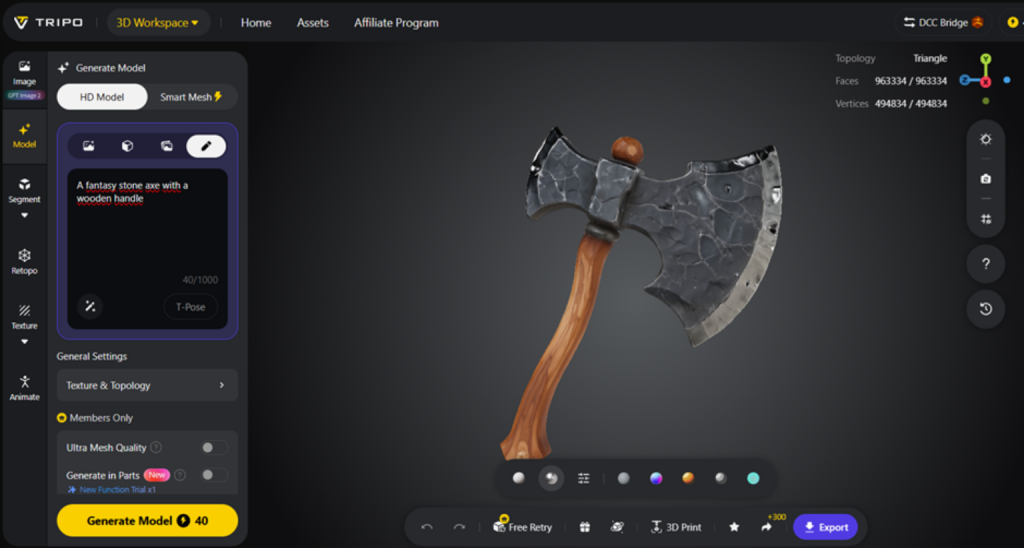
The prompt I tested: “A fantasy stone axe with a wooden handle”
-
Processing time: Exactly 120 seconds.
-
The Result: From a distance, it looks quite impressive. The colors are vibrant, and it has a great stylized/cartoonish look that is perfect for casual or indie mobile games. However, when you zoom in, the wooden handle is slightly warped in occluded angles, and the stone textures look a bit blurry rather than razor-sharp.
Test 2: Image-to-3D (Converting Photos into Models)
-
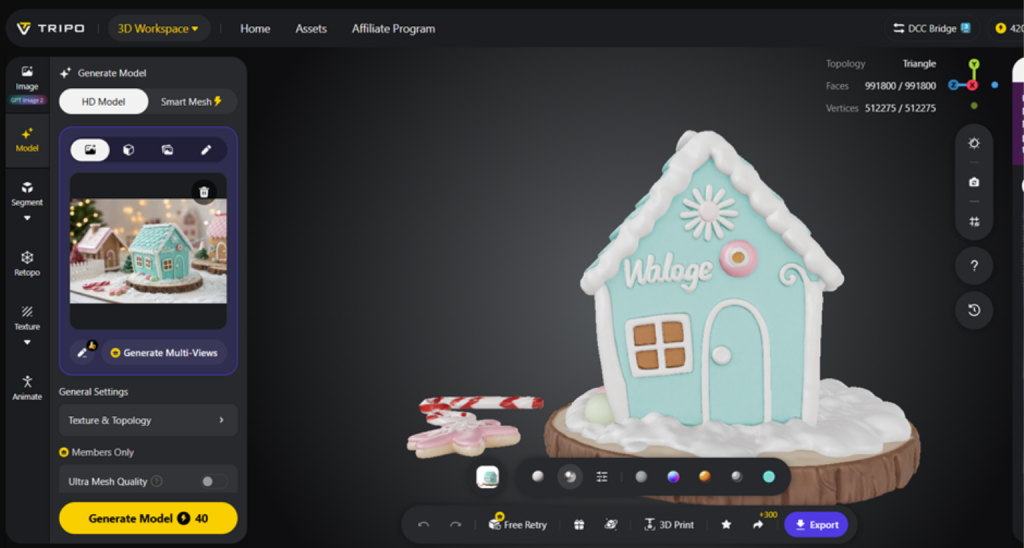
My input: I uploaded a photo of a gingerbread house decorated with cookies and candy.
-
Processing time: Around 120 seconds.
-
The Result: The depth recognition actually surprised me. The AI managed to make the candy pieces pop out distinctly. Afterward, I tested the AI texturing tool with the prompt: “Cover the walls with a layer of glossy caramel sauce”. The system took an extra 2 minutes to process and delivered a beautifully glossy, light-reflective surface.
2. The Core Reality of Tripo AI: A Strategic Trade-Off
To get the most out of Tripo AI, you need to keep one core principle in mind: This tool trades photorealistic fidelity for lightning-fast speed and low cost.
The AI-generated assets come with very clear technical pros and cons that you should know beforehand:
| Technical Check | Real-World Pros | Common AI-Generated Limitations |
| Geometry & Mesh | Performs exceptionally well with flat surfaces or simple rounded shapes (tables, chairs, wooden crates, cups, or rough toy bases). | The Blind-Spot Bug: The AI struggles with hollow structures or areas hidden from the camera’s view. For example, the trigger guard of a gun gets filled in, and intricate details like fingers or facial features can look blurry and fused together. |
| Texture & Shading | Colors are evenly distributed and look visually pleasing and vibrant right out of the box. | Texture Stretching: In tight crevices or deep folds, textures tend to stretch out, looking a bit messy or displaying strange vertical artifacts. |
| 3D Printing Utility | Generates STL files incredibly fast, making it great for rapid physical prototyping. | Non-Manifold Meshes: The AI-generated geometry often contains tiny tears or holes that are invisible to the naked eye. This causes 3D slicing software to error out, meaning you must manually repair the mesh to make it “watertight” before printing. |
3. Who Is Tripo AI For (And Who Should Avoid It)?
This breakdown will help you instantly determine whether this platform is worth your time and energy:
Who is Tripo AI perfect for?
-
Beginners & Content Creators: Anyone who wants to dive into 3D asset creation without spending months mastering steep learning curves on complex software.
-
Indie Game Developers: Great for rapidly generating bulk background props (rocks, trees, crates) to save on asset-purchasing budgets.
-
Concept Artists & Designers: Perfect for turning a text-based idea into a physical 3D layout in seconds to pitch concepts or test proportions.
-
3D Printing Hobbyists: Excellent for creating rapid base meshes and rough shapes that can be tweaked before hitting the print bed.
Who should look elsewhere?
-
AAA Game Studios: Projects that demand absolute geometric precision down to the millimeter.
-
Photorealistic Character Projects: Anything requiring highly detailed facial meshes, wrinkles, or lifelike skin micro-textures.
-
Close-Up Game Assets: Objects that the player will inspect heavily from a first-person perspective.
🚀 Related: If you love discovering game-changing tech, don’t miss our deep dive into “Why Lovable is the Most Important AI Unicorn of 2025 – 2026“. 🦄
4. How Does Its Pricing Stack Up Against Competitors?
At the time of writing, Tripo AI runs on a flexible credit-based system and offers a highly competitive price point:
-
The Free Plan (Basic): Gives you 300 credits per month (enough to generate roughly 10 objects). However, your models are published to a public community library, meaning anyone can view and download your work.
-
The Paid Plan (Professional): Sits around $11.94/month (based on current pricing at the time of writing). This plan keeps your generations completely private, unlocks batch processing, and grants full commercial rights so you can legally use your assets in monetized games or movies.
Quick Comparison Table:
| Criteria | Tripo AI | Meshy.ai | Luma AI Genie |
| Processing Speed | Fast (Around 1 min) | Average (1 – 2 mins) | Fast (Around 1 min) |
| Strongest Art Style | Stylized & Cartoonish | Photorealistic textures | Simple, low-poly shapes |
| Beginner-Friendliness | Very High (Web-ui) | High | Moderate |
| Cost Efficiency | Most Budget-Friendly | Higher per-credit cost | Ecosystem-tied |
Final Verdict: Is It Worth It?
Tripo AI is an excellent gateway into the 3D world, offering a frictionless experience with low costs and instant gratification. It successfully automates about 80% of the tedious “blocking out” phase of 3D modeling.
However, don’t expect it to spit out a flawless, production-ready Marvel character with a single click. For professional pipelines, Tripo AI creates “rough drafts.” To get it to a premium commercial standard, a human-in-the-loop workflow is required. You will still need to bring the file into software like Blender for 30 to 60 minutes of manual cleanup, UV stitching, and texture fixing. AI builds the foundation, but your hands provide the final artistry.
Your Turn to Create!
-
Want to test it out yourself? Try the free version over at: studio.tripo3d.ai
-
What prompt should I test next on Tripo AI? Or would you prefer an in-depth, head-to-head comparison review of Meshy AI or Hunyuan3D?
-
Let me know your thoughts in the comments section below, and let’s get the conversation started here at Thomas Review!
