
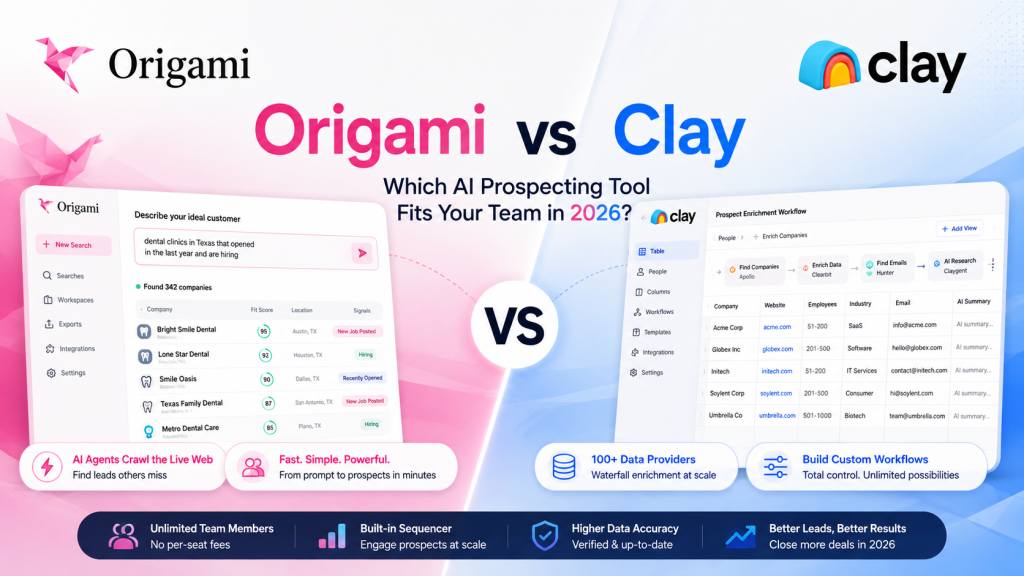
Quick Answer: Origami and Clay both move beyond simple database lookups, but for different audiences. Origami is a prompt-based prospecting agent — describe your ideal customer in plain English and it crawls the live web to find matches, at a flat rate ($0–$499/month, unlimited seats). Clay is a data orchestration platform built for RevOps and GTM engineering teams — a spreadsheet-style tool that runs waterfall enrichment (querying providers in sequence) across 100+ data sources, with far more customization but a steeper learning curve and higher cost ($0–$495+/month, usage-based, unlimited seats). Clay holds a stronger independent review base (4.7–4.9/5 across 300+ G2 reviews) than Origami, but is also widely described as taking weeks to master. If you want simple, fast prospecting, Origami is the easier starting point. If you need to build custom, multi-step enrichment pipelines across dozens of providers, Clay is built for exactly that.
This article compares Origami with Clay (clay.com), the GTM (go-to-market) data orchestration platform — not to be confused with other companies using the Clay name, such as Clay.earth (a personal relationship/networking app) or other unrelated products.
1. What’s the Core Difference Between Origami Ai and Clay Ai?
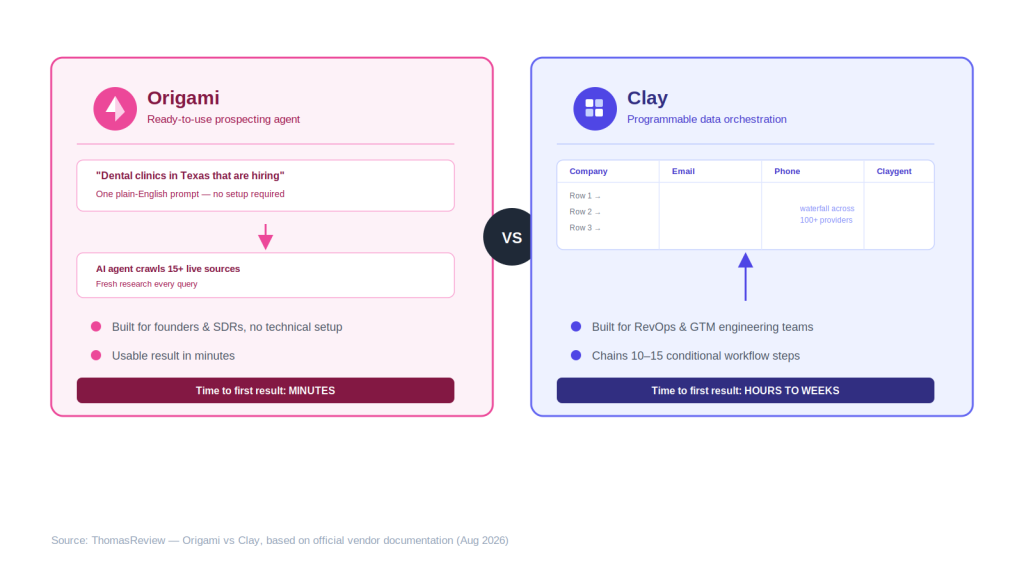
Quick Answer: Origami is a ready-to-use prospecting product: type a prompt, get a list. Clay is closer to a programmable spreadsheet for go-to-market (GTM) data — you build enrichment workflows column by column, chaining up to 10–15 steps with conditional logic, using Clay’s own AI agent (Claygent) for custom research tasks a standard data provider can’t answer.
This is a difference in both audience and philosophy. Origami is built so a founder or SDR (sales development rep) with no technical background can get a usable lead list in minutes. Clay is explicitly built for RevOps and GTM engineering teams comfortable with a table-based interface similar to Airtable — multiple independent reviews describe a real learning curve, with teams spending 5–6 hours or more just building their first workflows, and “weeks” to fully master advanced features like waterfall sequencing. For the full breakdown of Origami specifically, see our Origami AI Review.
2. Origami vs Clay: Side-by-Side Comparison
| Criteria | Origami | Clay |
|---|---|---|
| Founded / category | 2024 — AI prospecting agent | Established — GTM data orchestration platform |
| Core approach | Prompt-based live web crawling | Table-based workflows with waterfall enrichment |
| Data sources | 15+ live sources searched per query | 100+ integrated data providers (including Apollo, Clearbit, Hunter.io) |
| AI research agent | Yes — crawls live sources per prompt | Yes — Claygent, for custom research questions per row |
| Pricing model | Flat rate: $0–$499/mo, unlimited seats | Usage-based (Data Credits + Actions): $0–$495+/mo, unlimited seats |
| Learning curve | Low — plain-English prompts | High — reviewers report weeks to master advanced workflows |
| Independent reviews | 3.7–4.7/5, low review volume | 4.7–4.9/5 across 300+ G2 reviews |
| Built-in outbound sequencer | Yes, unlimited sends on paid plans | Yes — a basic sequencer is included even on the Free plan, with email campaign launches via integrations added on paid tiers, though Clay’s core focus remains enrichment/orchestration rather than outreach execution |
| Best fit | Founders, SDRs, small teams wanting fast setup | RevOps/GTM engineers building custom, multi-provider pipelines |
Table compiled from Origami’s and Clay’s official pricing pages, G2, and third-party reviews as of August 2026.
3. How Do Origami and Clay’s Pricing Models Differ?
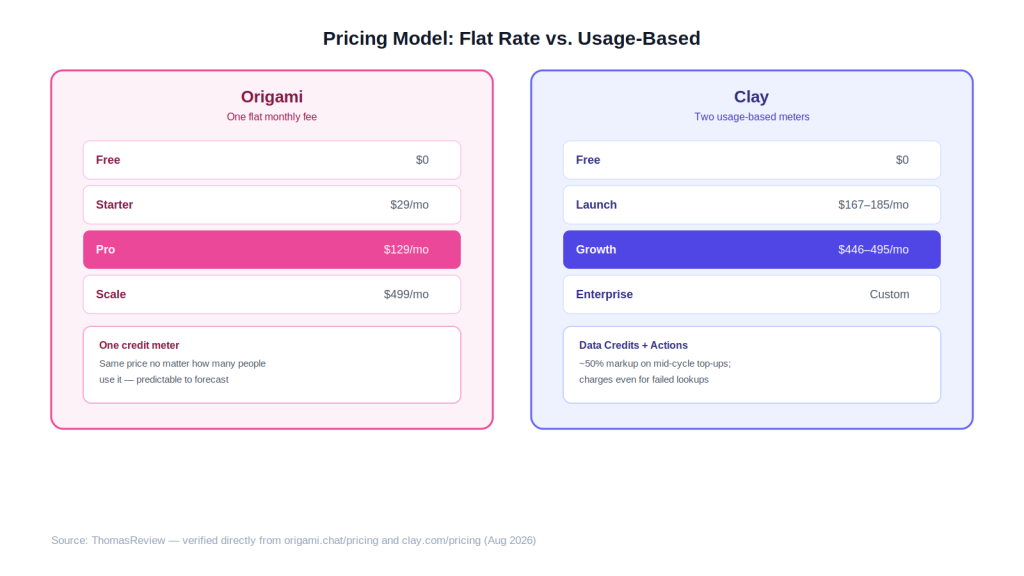
Quick Answer: Neither charges per seat, but the similarity mostly ends there. Origami charges a genuinely flat monthly fee regardless of how much you use within your tier’s credit allowance ($0–$499/month), while Clay’s cost scales more directly with actual usage across two separate meters — Data Credits for provider lookups and Actions for platform operations ($0–$495+/month). Clay’s entry paid tier ($185/month, or $167/month billed annually) also starts well above Origami’s ($29/month).
Clay’s cost structure also carries more documented complexity: credit rollover is capped at 2x your monthly allocation, top-up credits purchased mid-cycle carry roughly a 50% markup over your plan’s base rate, and Clay charges credits for enrichment attempts even when no data is found. Origami’s flat, single-meter system is comparatively simpler to forecast, though it offers far less granular control over which specific providers get queried.
Feature access also scales by tier: Clay’s Free plan already includes multi-provider waterfalls, Claygent, and up to 200 rows per table; Launch adds phone number enrichment and unlimited search via Audiences; Growth adds CRM auto-sync, unlimited HTTP API integration, and web intent signal tracking — features that matter most to teams building more automated, multi-system GTM workflows.
4. Which Has a Steeper Learning Curve?
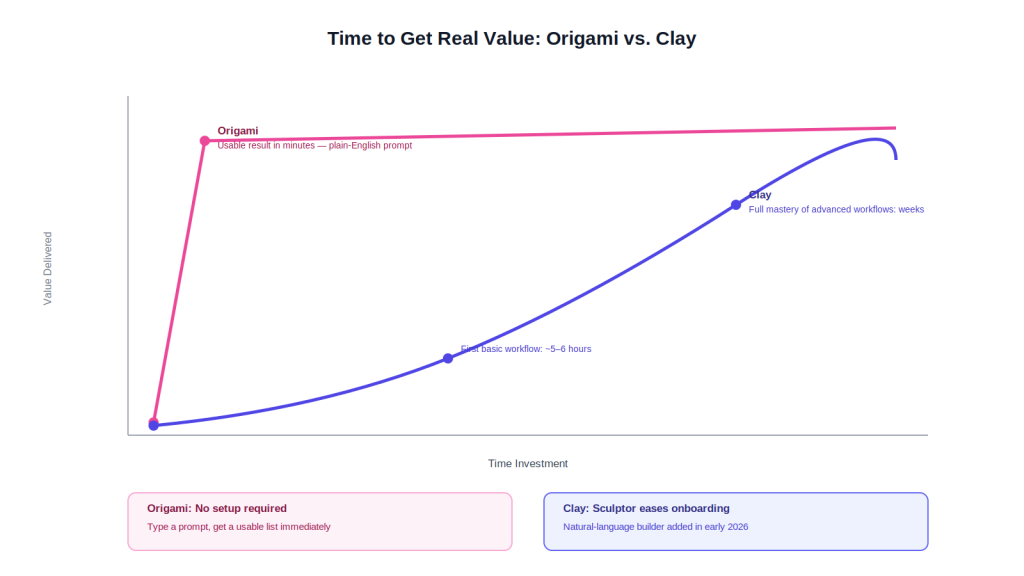
Quick Answer: Clay’s learning curve is consistently described as significantly steeper than Origami’s. Independent reviewers report spending 5–6 hours building a first basic workflow and “weeks” to fully master features like waterfall sequences and conditional logic, while Origami’s plain-English prompt interface is designed to produce a usable result in minutes with no technical setup.
This tradeoff is intentional on both sides. Clay added a natural-language workflow builder (Sculptor) in early 2026 specifically to lower this barrier, but reviewers still frame Clay as a tool for technically proficient GTM teams rather than a plug-and-play product. Origami’s simplicity is the whole pitch — it trades Clay’s deep customization for something a non-technical founder can use on day one.
5. Which Platform Has More Proven Reliability?
Quick Answer: Clay has a substantially larger and more consistent independent review base — commonly cited between 4.7 and 4.9 out of 5 across 300+ G2 reviews — compared to Origami’s smaller, more scattered footprint (3.7–4.7/5 across a handful of review platforms). Clay also has a documented case study showing a customer (OpenAI) increasing enrichment coverage from roughly 40% to over 80% using its waterfall model.
That gap again reflects Clay’s longer time in market and larger, more technical user base rather than a definitive quality signal — but it does mean there’s more independent evidence available to evaluate Clay’s claims than Origami’s.
ThomasReview’s Take
The most important thing to get right about this comparison is that Origami and Clay aren’t really built for the same buyer. Origami’s own blog explicitly points to Clay as the better option for complex, multi-step enrichment — and having looked at both platforms’ actual design, that’s an honest, not just diplomatic, framing. Clay is a genuinely more powerful tool if your team has the technical capacity to use it: 100+ data providers, custom AI research via Claygent, and workflows precise enough to chain ten-plus conditional steps. That power is exactly why G2 reviewers who stick with it rate it so highly.
But “more powerful” isn’t the same as “better for your team.” If you’re a founder or a small sales team that wants a usable prospect list without a multi-week onboarding process, Clay’s learning curve and credit complexity are real costs — not just a rougher UI, but a genuine risk of the kind of “nickel-and-dimed” spend that shows up repeatedly in independent Clay reviews. Origami’s flat, simple pricing and plain-English interface trade away Clay’s customization for something that’s usable on day one, which matters more than raw capability for teams that don’t have (or want) a dedicated RevOps engineer running their data stack.
6. Which Should You Choose?
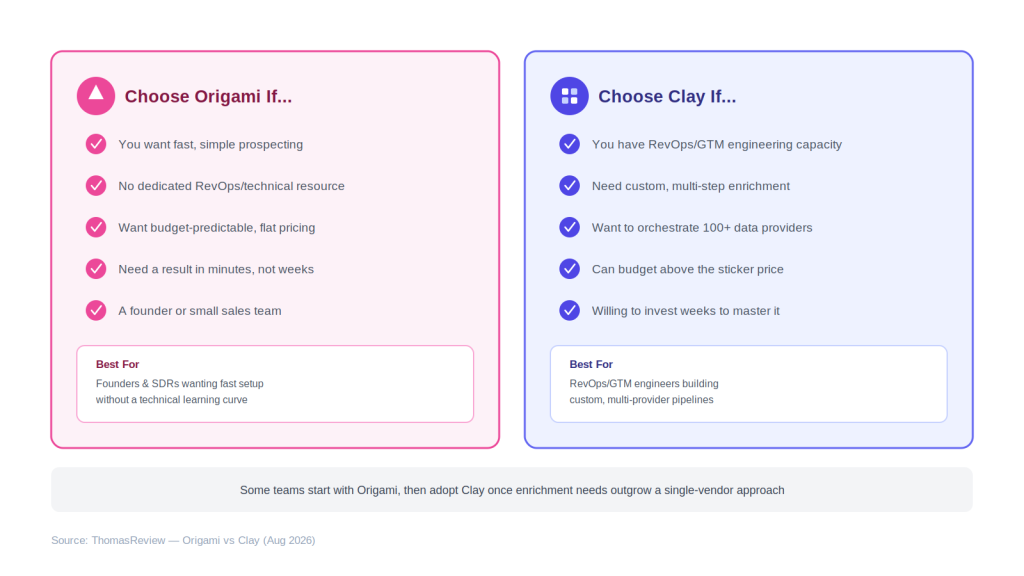
Quick Answer: Choose Origami if you want fast, simple, budget-predictable prospecting and don’t have a dedicated technical resource to manage a complex tool. Choose Clay if you have RevOps or GTM engineering capacity and need to orchestrate enrichment across many data providers in customized, multi-step workflows — and can budget above the sticker price for credit usage.
Some teams reasonably use both at different stages: starting with Origami for straightforward prospecting, then adopting Clay once their enrichment needs outgrow a single-vendor, prompt-based approach.
📌 Related Reading: For the full technical and pricing breakdown of Origami’s platform, see our Origami AI Review. Comparing database-led tools instead? See our Origami vs Apollo comparison, or our three-way cost breakdown, Origami vs Apollo vs Clay Pricing.
Frequently Asked Questions
Is Clay harder to learn than Origami? Yes. Clay added a natural-language workflow builder (Sculptor) in early 2026 specifically to ease onboarding, but independent reviewers still describe real ramp-up time for advanced features — versus Origami’s plain-English prompts, which require no setup at all.
Can Clay replace Origami, or do they solve different problems? They overlap partially but aren’t full substitutes. Origami is a self-contained prospecting tool; Clay is an orchestration layer that could theoretically be configured to replicate parts of Origami’s function, but would require significantly more setup and technical skill to do so.
Which is cheaper for a small team? Origami, in nearly every case. Its entry paid plan ($29/month) starts well below Clay’s ($185/month), and Origami’s single-credit system is simpler to forecast without risking Clay’s documented top-up markups.
Does Clay have a built-in sequencer like Origami? Yes, to a degree — Clay includes a basic sequencer even on its Free plan, with email campaign launches via integrations added on paid tiers. That said, Clay’s primary focus is data enrichment and orchestration rather than outbound execution, so its sequencing capabilities are generally considered less central than Origami’s, which is built around unlimited sequencer sends as a core feature on paid plans.
ThomasReview Verdict
Origami and Clay sit at opposite ends of the simplicity-versus-power spectrum in AI-assisted prospecting. Origami wins on speed to value, pricing predictability, and accessibility for non-technical teams. Clay wins on raw capability, data source breadth, and independent review volume — but asks for a real investment in time and budget to use well. Pick based on whether your team wants a tool that works immediately or a platform built to be engineered around your specific GTM stack.
Sources
- Origami pricing page — verified plan pricing
- Clay pricing page — verified directly, including tier-specific features
- Clay Pricing 2026 — Cleanlist — verified against clay.com/pricing, August 2026
- Clay Reviews — G2 — independent review data
- Clay Reviews: What GTM Teams Find in 2026 — ZoomInfo — Claygent details, OpenAI case study, G2 rating
- What Does Clay Really Do? Features vs Marketing — Amplemarket — Sculptor, workflow depth, G2 quotes
- Clay.com Review 2026 — Marketbetter — credit system and match-rate analysis
- Origami AI Review — ThomasReview — full Origami platform breakdown
Disclaimer: Pricing, features, and review scores in this article are drawn from each vendor’s official materials and third-party reviews as of August 2026, and are subject to change — particularly for Clay, which changed its pricing structure significantly in March 2026. Businesses should verify current pricing and features directly with each vendor before making a purchasing decision.
