
Quick Verdict
Best for
- ✅ Content creators, YouTubers, and podcasters who need fast transcripts and subtitles
- ✅ Creators making multilingual content who need subtitles translated into several languages
- ✅ Anyone who wants to fine-tune transcripts inside a built-in editor
- ✅ Users who occasionally need near-perfect accuracy and are willing to pay extra for human transcription
Not ideal if
- ❌ You need live meeting transcription — Otter.ai handles this better
- ❌ You need text-based video editing — Descript is a better fit
- ❌ You process very high volumes of audio monthly and want the cheapest pay-as-you-go rate
Happy Scribe is an AI-powered transcription and subtitling tool that supports over 150 languages. After testing it with both single-speaker audio and overlapping multi-speaker audio, I found it to be a reliable transcription tool for content creators — with a few caveats worth knowing.
What Is Happy Scribe?
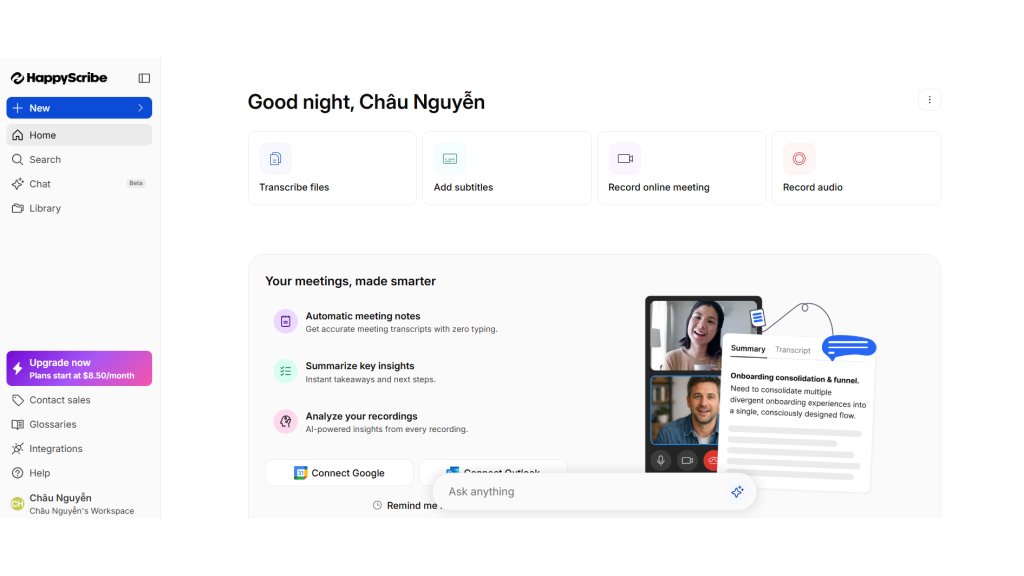
Happy Scribe is a web-based transcription and subtitling platform that converts audio/video into text using AI, supporting more than 150 languages. Beyond AI transcription, Happy Scribe also offers human transcription for cases that demand the highest possible accuracy — think journalistic interviews, academic research, or legal content. The platform serves content creators, journalists, researchers, and business teams.
📚 Related read: Turning those interview transcripts into an academic paper next? See our Paperpal AI Review: Is It Worth Paying for If You Write Research Papers? to find out if it’s worth the subscription.
Core features include:
- AI transcription (automatic)
- Human transcription (optional, paid add-on)
- Subtitle creation and export (SRT, VTT, etc.)
- Multilingual subtitle translation
- Built-in transcript editor
Who Should Use Happy Scribe
If you’re a content creator or podcaster, ask yourself:
- Do you regularly need subtitles for YouTube videos, especially in multiple languages to reach a global audience?
- Do you need a clean transcript to turn into a blog post, show notes, or social captions?
- Are you willing to spend a little time reviewing the AI-generated transcript before publishing?
If you answered yes, Happy Scribe is worth considering.
Core Features
AI Transcription
How it works: upload your audio/video file, select a language, and Happy Scribe automatically processes it and returns a transcript within minutes (depending on file length).
According to independent reviews, AI accuracy ranges from 85–99% depending on audio quality: highest with clean, single-speaker audio, and lower with background noise, heavy accents, or overlapping speakers.
Real-world test: To verify this, I ran two tests at different difficulty levels.
Test 1 — Single speaker, clear audio: I used the TED-Ed video “What staying up all night does to your brain” by Anna Rothschild (about 5 minutes, one narrator, moderate pace).
Source: TED-Ed channel
The result was nearly perfect, correctly transcribing even a scientific term like “suprachiasmatic nucleus.”
Test 2 — Multiple speakers, overlapping: I used a debate clip from The View (posted by Page Six), about 1 minute long: multiple speakers talking over each other, fast pace, frequent interruptions.
Source: Page Six channel
This is a difficult scenario for most AI transcription tools. Still, Happy Scribe managed to separate individual speakers (speaker labeling) and correctly transcribed most of the content, even in segments where two people talked over each other.
Overall observation: In both tests, Happy Scribe produced accurate transcripts that needed little to no editing. That said, this was with good-quality audio. With lower-quality recordings — cheap microphones, noisy rooms, quiet or compressed audio — the risk of errors increases.
For high-stakes content — exclusive interviews, legal material, or poor-quality audio — the human transcription add-on ($2/minute) is the safer choice.
Subtitles & Multilingual Translation
Happy Scribe lets you export subtitles directly in SRT and VTT formats and translate them into over 150 languages — handy if you want to grow your YouTube channel or podcast internationally without hiring a separate translator.
Best suited for:
- Creators adding bilingual or multilingual subtitles to videos
- Educational content creators who need accurate captions for deaf or hard-of-hearing viewers
- Channels optimizing YouTube SEO with full transcripts/captions
Built-in Transcript Editor
Once the AI draft is ready, you can edit it directly on the platform: replay the corresponding audio, skip forward/back 5 seconds, and fix mistakes right in the interface. No need to download the file and edit it in separate software.
Pros
High accuracy with good-quality audio — Based on my own tests and independent reviews from TechRadar, AI accuracy on clean audio is highly reliable, even with multiple speakers.
Exceptionally broad language support — Over 150 languages is a standout number compared to many competitors, especially useful for creators reaching a global audience.
Human transcription option when you need maximum accuracy — Not every AI transcription tool offers a human-review option; this matters when you can’t afford mistakes, such as with legal content or exclusive interviews.
Easy-to-use interface — Reviews on both G2 and Capterra consistently praise the intuitive design, easy to pick up even for first-time users.
Things to Consider
Accuracy drops with lower-quality audio — Background noise, heavy accents, or poor recording quality can lead to more transcription errors. Always review the transcript before publishing.
Short free trial — Only 10 minutes of free AI transcription, not quite enough to properly evaluate longer files or varied real-world scenarios.
Human transcription is pricey — At $2/minute (roughly $120/hour), it’s on the higher end of the market, worth considering if you’ll use it regularly.
Monthly minute caps — All paid plans cap monthly AI transcription minutes; going over means paying extra per minute.
What the Community Says
I checked reviews across several independent sources:
TechRadar (hands-on test, independently edited) praised the accuracy, huge language selection, and reasonable pricing; the only downside noted was the lack of live transcription. → Read the full review on TechRadar
G2 — a verified B2B software review platform — shows Happy Scribe at roughly 4.7–4.8/5 stars, with speaker identification and customer support rated especially high. → See reviews on G2
Trustpilot — over 1,200 reviews, 4.6/5 stars — with much of the positive feedback coming from journalists and newsroom editors who use Happy Scribe daily. → See reviews on Trustpilot
Capterra notes that users particularly like the ability to export .vtt subtitle files and the option to have a human polish the automated transcript. → See reviews on Capterra
Across these sources, a clear pattern emerges: users consistently praise accuracy and ease of use, while the most common complaints center on the short free trial and the cost of human transcription.
Note: I only used sources with verified reviews and clear attribution. Some other reviews online contain “testimonials” with no traceable source or signs of being fabricated — I chose not to use those sources in this article.
Alternatives
| If your priority is… | Consider |
|---|---|
| Live, real-time meeting transcription | Otter.ai |
| Text-based video editing | Descript |
| Highest AI accuracy at low pay-as-you-go rates | Sonix |
| Flexible per-minute pricing with no monthly plan | Rev |
| Transcription plus multilingual subtitles, with a human-review option | Happy Scribe |
ThomasReview Verdict
Two tests — one with single-speaker audio, one with overlapping multi-speaker audio — produced consistent results: Happy Scribe transcribed accurately in both cases, including the harder scenario of speakers talking over each other.
For content creators and podcasters working in multiple languages, this is a tool worth trying: reasonable starting price, a free trial, and a human transcription option for when perfect accuracy matters. Test the free 10 minutes with your own audio before committing to a paid plan.
FAQ
Is Happy Scribe accurate? AI accuracy is quite high with good-quality audio, even with multiple speakers. It drops with noisy or poorly recorded audio — so review the transcript before using it officially.
Does Happy Scribe have a free trial? Yes, but it’s limited to 10 minutes of AI transcription — enough to try the interface, but a bit short for testing longer audio.
When should I use human transcription instead of AI? Consider it when mistakes aren’t an option — exclusive interviews, legal documents, academic research — or when the audio is poor quality with frequent overlapping speakers. These are the situations where AI is most likely to make errors.
Who is Happy Scribe best for? Content creators, YouTubers, and podcasters who need fast, multilingual transcripts and subtitles; journalists and researchers processing many hours of interview audio.
Pricing (Updated 2026)
| Plan | Monthly (billed monthly) | Monthly (billed annually) | AI minutes/month |
|---|---|---|---|
| Free Trial | Free | — | 10 minutes |
| Basic | $17 | $8.5 | 120 minutes |
| Pro | $29 | $19 | 600 minutes |
| Business | $89 | $59 | 6,000 minutes |
| Human Transcription | $2/minute (roughly $120/hour) | — | As needed |
Overage rate: about $0.20/minute. Prices are subject to change — check Happy Scribe’s official pricing page before purchasing.
This article is based on thomasreview’s hands-on testing, combined with references to verified, independent reviews (TechRadar, G2, Capterra, Trustpilot). Happy Scribe is headquartered in Barcelona, Spain.
