
AI video generation is evolving at an incredible pace. In just a few years, AI video tools have gone from producing short clips filled with visual errors to creating videos with natural motion, consistent characters, and even synchronized audio.
Among the most talked-about platforms today is PixVerse AI, which frequently appears across TikTok, Instagram Reels, and YouTube Shorts. The latest version, PixVerse V6, promises improvements in image quality, motion realism, and multi-shot storytelling.
To evaluate these claims objectively, I reviewed the official documentation and conducted several real-world tests myself.
What Is PixVerse AI?
PixVerse AI is an AI-powered video generation platform that allows users to turn text prompts or images into videos within minutes.
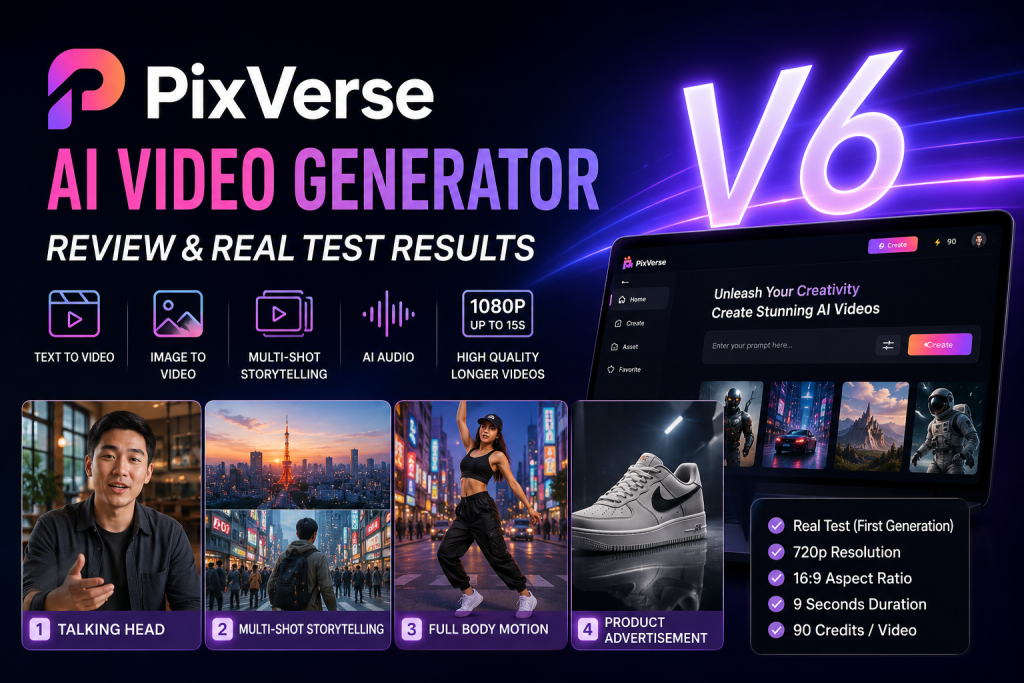
Its main features include:
- Text-to-Video
- Image-to-Video
- Multi-Shot Storytelling
- AI-generated audio
- Short-form video creation for TikTok, Reels, and YouTube Shorts
PixVerse’s biggest strengths are its beginner-friendly interface, fast generation speed, and ability to create cinematic-looking videos without requiring professional editing skills.
Key Improvements in PixVerse Ai V6
Based on both the official documentation and my hands-on experience, three upgrades stand out in PixVerse V6.
Multi-Shot Storytelling
Users can describe multiple scenes within a single prompt. The AI automatically generates different camera angles and transitions between shots.
Built-In Audio Generation
PixVerse can generate voiceovers, sound effects, and ambient audio directly during the video creation process.
Longer Videos and Higher Quality
PixVerse V6 supports videos up to 15 seconds long at resolutions up to 1080p, making it easier to create complete video sequences rather than extremely short clips.
Testing Methodology
To evaluate PixVerse V6 under common real-world use cases, I conducted four representative tests:
- Talking Head
- Multi-Shot Storytelling
- Full Body Motion
- Product Advertisement
All videos were generated under identical conditions:
- First-generation output (no retries)
- 16:9 aspect ratio
- 9-second duration
- 720p resolution
- 90 credits per video
Using the same settings across all tests allowed for a more consistent comparison.
Test 1: Talking Head
Prompt
A young Vietnamese man standing in a modern coffee shop. He looks directly into the camera and says: “Welcome to my channel.” Natural facial expressions. Subtle hand gestures. Realistic lip sync. Soft daylight coming through the window. Shallow depth of field. Cinematic camera. Professional video quality.
Results
✅ Stable facial structure
- No noticeable facial distortion.
- Eyes, nose, and mouth remained proportionally consistent throughout the video.
✅ Attractive background
- Natural depth-of-field effect.
- Soft lighting similar to footage captured with a real camera.
✅ Natural expressions
- The smile changed subtly over time.
- The character did not appear stiff or frozen.
Verdict
The lip-sync was surprisingly accurate. The mouth and teeth maintained their shape during speech, resulting in a much more natural appearance than many earlier AI video models.
Test 2: Multi-Shot Storytelling (Tokyo)
Prompt
Shot 1: Wide aerial view of Tokyo at sunset.
Shot 2: The same traveler walking through Shibuya Crossing.
Shot 3: Close-up of the traveler looking at neon signs.
Consistent character appearance. Cinematic storytelling. Natural transitions.
Results
✅ The AI correctly understood the storyboard structure.
✅ Strong character consistency.
- Clothing remained unchanged.
- Hairstyle remained unchanged.
- Colors stayed consistent across scenes.
✅ Logical scene transitions.
The shots felt like parts of the same story rather than three unrelated video clips.
Verdict
The character’s face remained consistent between scenes. Clothing, colors, and lighting were also maintained throughout the sequence. This is particularly important because multi-shot storytelling is one of PixVerse V6’s headline features, and the real-world results closely matched the platform’s claims.
Test 3: Viral Dance / Full Body Motion
Prompt
A fashionable young woman dancing confidently on a city street. Full body visible. Smooth camera tracking. Natural body movement. Trending TikTok style. Energetic atmosphere.
Results
✅ Continuous body movement.
- The character performed multiple dance movements.
- Body poses changed frequently.
✅ Full-body visibility throughout the video.
This test is significantly more challenging than a talking-head scenario because the AI must accurately handle multiple moving joints at the same time.
Verdict
The hands were not distorted. Hair did not clip through the body. Legs were not unnaturally stretched, and knee movements appeared realistic.
This result is noteworthy because hand, leg, and joint deformation remains one of the most common weaknesses in AI-generated video.
Test 4: Product Advertisement (Sneaker)
Prompt
The camera slowly rotates around the product. Soft reflections. Professional commercial lighting. Premium advertisement style.
Results
✅ Sharp product details.
- The shoe texture was clearly visible.
- The sole was rendered accurately.
✅ Smooth camera movement.
- The result felt similar to a professional commercial advertisement.
✅ High-quality studio lighting.
- The overall presentation looked polished and professional.
Verdict
The logo remained intact without distortion. The shoe shape and sole structure stayed consistent throughout the clip, and material details were clearly visible.
Among all four tests, this produced the strongest overall result.
🎬 Want to take your content creation to the next dimension? Moving images are great, but pairing them with custom 3D assets changes the whole game. Don’t miss our hands-on test 👉 The Truth About Tripo AI: 30-Second 3D Model Generation or Just a Gimmick? and discover how to create 3D models in under a minute!
Pros
- Easy-to-use interface
- Fast video generation
- Effective multi-shot storytelling
- Strong image quality
- Built-in audio generation
- Good character consistency
- Excellent results for product advertisements
Cons
- Video length is still relatively short
- Complex scenes can still produce AI-related errors
- Multiple generations may consume credits quickly
- Not a replacement for professional video editing software
Final Verdict
Based on four real-world tests generated on the first attempt at 720p resolution, 16:9 aspect ratio, 9 seconds in length, and 90 credits per video, PixVerse Ai V6 performed better than I expected.
The strongest evidence came from three areas:
- Accurate and stable lip-sync in the Talking Head test.
- Consistent character appearance across multiple scenes in the Multi-Shot Storytelling test.
- No major hand, leg, or product deformation issues in the Full Body Motion and Product Advertisement tests.
These results suggest that PixVerse Ai V6 is capable of maintaining visual quality throughout motion rather than producing videos that only look good in a thumbnail.
If your goal is to create TikTok videos, Instagram Reels, YouTube Shorts, or short-form marketing content without extensive editing experience, PixVerse V6 is definitely worth trying.
However, if you need long-form productions, advanced creative control, or a professional filmmaking workflow, traditional video editing software remains the better choice for now.
